Note
Go to the end to download the full example code.
Virtual Fields Method Verification
In this example, we verify the virtual
power residual calculation for a
boundary value problem (BVP) with an
analytical solution. To conform
to our VFM implementation constraints,
we chose a thin plate of length  loaded in uniaxial tension in the Y
direction with a distributed load with
an over all magnitude of
loaded in uniaxial tension in the Y
direction with a distributed load with
an over all magnitude of
 .
Assuming linear elasticity and
small deformation, the stress
in the Y direction in the plate is
.
Assuming linear elasticity and
small deformation, the stress
in the Y direction in the plate is

where  is the plate
width and
is the plate
width and  is the
plate thickness. All other
stresses are zero.
The in-plane displacements in the plate
are given by
is the
plate thickness. All other
stresses are zero.
The in-plane displacements in the plate
are given by

and

where  is the material elastic modulus,
 is the material Poisson’s ratio, and
 and
and  are the locations on the plate.
The internal virtual power becomes

where  is the
  .
The virtual velocity function used is
.
The virtual velocity function used is

With this virtual velocity function, the virtual velocity gradient component of interest is

As a result, the internal virtual power is given as

The external virtual power, as expected, results an equivalent value.

With an analytical solution for the virtual internal and external powers available for the BVP of interest, we will create MatCal VFM objects with the proper input and verify that they return the expect values.
We will begin by creating synthetic data that represents the experimental data for this BVP. To do so, we import MatCal’s tools and create the variables needed for the analytical solutions above. We will need:
The materials elastics constants
and . We choose values that
are similar to steel with  GPa
and
GPa
and  .
.The plate dimensions
 mm,
mm,  ,
and
,
and  mm with a discretization in Y and Y.
The load magnitude as a function of time
 .
We will choose such that
the maximum stress in the plate is 100 MPa.
.
We will choose such that
the maximum stress in the plate is 100 MPa.The number of time steps and the time values.
from matcal import *
import numpy as np

E = 200e9
nu = 0.25

H = 15.2e-3
W = 7.6e-3
T = 0.1e-3

measured_num_points = 10
measured_xs = np.linspace(0, W, measured_num_points)
measured_ys = np.linspace(0, H, measured_num_points)
measured_x_grid, measured_y_grid = np.meshgrid(measured_xs, measured_ys)


n_time_steps = 10
L = np.linspace(0, 100e6*W*T,n_time_steps).reshape(n_time_steps,1)
time = np.linspace(0,1,n_time_steps)
With all the required inputs initialized, we can
create the FieldData objects
that are need to have MatCal evaluate the virtual powers
for the problem. The FieldData
object requires several fields:
time
load
The X locations of the field data
The Y locations of the data
The X displacements for each point (U)
The Y displacements for each point (V)
sigma_yy = L/(W*T)

def displacements(x,y):
    return  -nu*sigma_yy/E*x, sigma_yy/E*y

all_x_1D = measured_x_grid.reshape(measured_num_points**2)
all_y_1D = measured_y_grid.reshape(measured_num_points**2)
u,v = displacements(all_x_1D, all_y_1D)
After creating the values for the
fields that we need, they can be combined
into a dictionary and converted into
a MatCal FieldData
object using the
convert_dictionary_to_field_data()
function.
data_dict = {'time':time, 'load':L,
             "X":all_x_1D,
             "Y":all_y_1D,
             "U":u,
             "V":v}

field_data = convert_dictionary_to_field_data(data_dict,
                                              coordinate_names=["X", "Y"])
Next, a discretization for
the VFM models must be created.
MatCal has a simple tool
for creating rectangular volumes
that we will use, the
auto_generate_two_dimensional_field_grid()
function. It requires the number of X and Y discretization points and the field data
that the mesh is intended to encapsulate as inputs.
It will return MatCal’s two dimensional mesh class that can be
used as a mesh input to MatCal’s VFM model. It currently
can only be used for rectangular shapes without holes.
from matcal.full_field.TwoDimensionalFieldGrid import auto_generate_two_dimensional_field_grid
auto_mesh = auto_generate_two_dimensional_field_grid(measured_num_points*5,
                                                     measured_num_points*5, field_data)
The next item needed for the creation of the
MatCal VFM models is a SierraSM material file.
We will create a simple elastic material model file
using Python file tools and then create a
MatCal Material
object so the VFM models can use that material.
material_file_string = \
"""
  begin material steel
    begin parameters for model elastic
      youngs modulus                =  {E}
      poissons ratio                =   {nu}
    end
  end
"""

with open("elastic_material.inc", "w") as mf:
    mf.write(material_file_string)

material = Material("steel", "elastic_material.inc", "elastic")
We can now create the VFM models that we want
to evaluate. We will look at two VFM models,
The VFMUniaxialTensionHexModel
and the VFMUniaxialTensionConnectedHexModel
will both be evaluated in this verification example.
The models require a material, a mesh and thickness
to be initialized and field data with a two-dimensional displacement field
to be added as the boundary condition data. We optionally set the names
so their results can be more easily pulled from the results
data object returned from our study.
default_hex_model = VFMUniaxialTensionHexModel(material, auto_mesh, T)
default_hex_model.set_name("default_VFM_hex_model")
default_hex_model.add_boundary_condition_data(field_data)
default_hex_model.set_number_of_time_steps(20)

connected_hex_model = VFMUniaxialTensionConnectedHexModel(material, auto_mesh, T)
connected_hex_model.set_name("VFM_connected_hex_model")
connected_hex_model.add_boundary_condition_data(field_data)
connected_hex_model.set_number_of_time_steps(20)
The final step is to create the parameters for the study,
the objective to be evaluated
and the study itself. For our elastic model, the
only parameters we need are the elastic modulus and
the Poisson’s ratio. The study we will use to evaluate
the models is the ParameterStudy
since just need the model results at our predetermined
steel-like parameter values. Since this study is
evaluating a VFM model, we create a VFM model
with no inputs because our global data fields
of “time” and “load” match the default ones
expected by the objective.
E_param = Parameter('E', 100e9, 300e9)
nu_param = Parameter('nu', 0.1, 0.5)

vfm_objective = MechanicalVFMObjective()
vfm_objective.set_name('vfm_objective')
After creating the parameters, objectives, synthetic data and models, we can create the study and add the evaluation sets and parameter values that we want to evaluate. The study is then launched and the results are stored in an object that we can analyze when the study completes.
study = ParameterStudy(E_param, nu_param)
study.add_parameter_evaluation(E=E, nu=nu)
study.add_evaluation_set(default_hex_model, vfm_objective, field_data)
study.add_evaluation_set(connected_hex_model, vfm_objective, field_data)
study.set_core_limit(3)
results = study.launch()
You are using exodus.py v 1.21.6 (seacas-py3), a python wrapper of some of the exodus library.

Copyright (c) 2013-2023 National Technology &
Engineering Solutions of Sandia, LLC (NTESS).  Under the terms of
Contract DE-NA0003525 with NTESS, the U.S. Government retains certain
rights in this software.

Opening exodus file: matcal_template/default_VFM_hex_model/matcal_default_state/default_VFM_hex_model.g
Closing exodus file: matcal_template/default_VFM_hex_model/matcal_default_state/default_VFM_hex_model.g
Opening exodus file: matcal_template/default_VFM_hex_model/matcal_default_state/default_VFM_hex_model.g
Closing exodus file: matcal_template/default_VFM_hex_model/matcal_default_state/default_VFM_hex_model.g
Opening exodus file: matcal_template/default_VFM_hex_model/matcal_default_state/default_VFM_hex_model.g
Closing exodus file: matcal_template/default_VFM_hex_model/matcal_default_state/default_VFM_hex_model.g
Opening exodus file: matcal_template/default_VFM_hex_model/matcal_default_state/default_VFM_hex_model.g
Opening exodus file: matcal_template/default_VFM_hex_model/matcal_default_state/default_VFM_hex_model_exploded.g
Closing exodus file: matcal_template/default_VFM_hex_model/matcal_default_state/default_VFM_hex_model_exploded.g
Closing exodus file: matcal_template/default_VFM_hex_model/matcal_default_state/default_VFM_hex_model.g
Opening exodus file: matcal_template/VFM_connected_hex_model/matcal_default_state/VFM_connected_hex_model.g
Closing exodus file: matcal_template/VFM_connected_hex_model/matcal_default_state/VFM_connected_hex_model.g
Opening exodus file: matcal_template/VFM_connected_hex_model/matcal_default_state/VFM_connected_hex_model.g
Closing exodus file: matcal_template/VFM_connected_hex_model/matcal_default_state/VFM_connected_hex_model.g
Opening exodus file: matcal_template/VFM_connected_hex_model/matcal_default_state/VFM_connected_hex_model.g
Closing exodus file: matcal_template/VFM_connected_hex_model/matcal_default_state/VFM_connected_hex_model.g
In this verification problem, our
goal is to verify that our MatCal
VFM objective is accurately evaluating
the internal and external virtual powers.
As a result, we extract these virtual powers
from the study results and compare them to
the analytically determined value for the internal power
 . We compare them by
evaluating their percent error with the following equation
. We compare them by
evaluating their percent error with the following equation
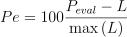
where  is the evaluated virtual power
(either the internal or external from either model).
Since we will evaluate this percent error several times,
we make a function to perform the calculation.
is the evaluated virtual power
(either the internal or external from either model).
Since we will evaluate this percent error several times,
we make a function to perform the calculation.
def percent_error(prediction, actual):
    return (prediction - actual)/np.max(actual)*100
We then extract the results from each of the models and print or plot their errors.
matcal_internal_power_default = results.best_simulation_qois(default_hex_model,
                                                             vfm_objective,
                                                             field_data.state,
                                                             0)["virtual_power"]
matcal_external_power_default = results.get_experiment_qois(default_hex_model,
                                                             vfm_objective,
                                                             field_data.state,
                                                             0)["virtual_power"]

matcal_internal_power_connected = results.best_simulation_qois(connected_hex_model,
                                                             vfm_objective,
                                                             field_data.state,
                                                             0)["virtual_power"]
matcal_external_power_connected = results.get_experiment_qois(connected_hex_model,
                                                             vfm_objective,
                                                             field_data.state,
                                                             0)["virtual_power"]

print(percent_error(matcal_external_power_default, L))
print(percent_error(matcal_external_power_connected, L))
[[0.]
 [0.]
 [0.]
 [0.]
 [0.]
 [0.]
 [0.]
 [0.]
 [0.]
 [0.]]
[[0.]
 [0.]
 [0.]
 [0.]
 [0.]
 [0.]
 [0.]
 [0.]
 [0.]
 [0.]]
Both of the external powers have no error. This is expected as our experimental data for this study was exact. This result demonstrates in part that all of the MatCal’s VFM objective calculations and virtual fields are correctly implemented. We have unit tests that test each of the components to contribute to this individually. The next evaluation compares the internal virtual power to the expected virtual power. This is significantly more involved as it requires the simulation of the VFM model using SierraSM.
internal_power_error_default = percent_error(matcal_internal_power_default.reshape(10,1), L)
internal_power_error_connected = percent_error(matcal_internal_power_connected.reshape(10,1), L)
print(internal_power_error_default)
print(internal_power_error_connected)
[[ 0.        ]
 [-0.0006654 ]
 [-0.00260389]
 [-0.00581517]
 [-0.01029905]
 [-0.01608401]
 [-0.02317037]
 [-0.03152879]
 [-0.04115908]
 [-0.05206094]]
[[ 0.        ]
 [-0.0006654 ]
 [-0.00260389]
 [-0.00581517]
 [-0.01029905]
 [-0.01608401]
 [-0.02317037]
 [-0.03152879]
 [-0.04115908]
 [-0.05206094]]
When we print the percent errors, it is clear that the some part of the process has introduced errors. The magnitude of the maximum error is 0.05%. To further investigate, we plot the internal power errors as a function time.
import matplotlib.pyplot as plt

plt.plot(time, internal_power_error_default, label="default VFM model", marker='o')
plt.plot(time, internal_power_error_connected, label="connected hex VFM model")

plt.xlabel("time (s)")
plt.ylabel("Internal Power Error (%)")
plt.legend()
plt.show()
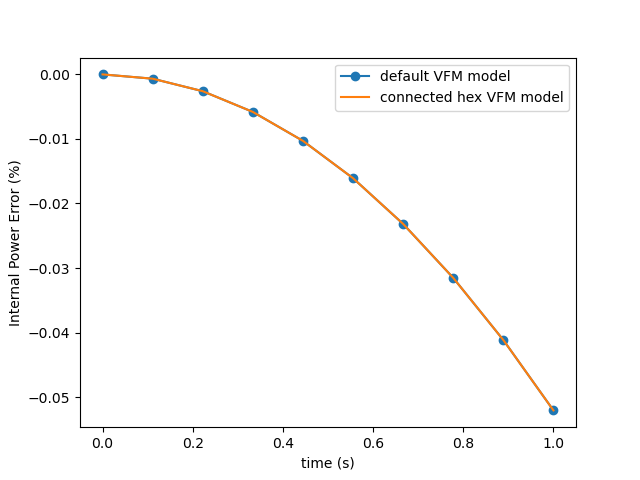
The error is increasing quadratically as the load is increased and the model becomes more deformed. This error is due to our initial assumption of small deformation. SierraSM is formulated as a large deformation code. As a result, our small deformation assumption results in this small, but noticeable error. In later verification examples, we evaluate our methods with synthetic data using large deformation solutions and are able to obtain results with much smaller errors.
Total running time of the script: (2 minutes 1.271 seconds)