matcal.core.adaptive_surrogates
This module contains adaptive surrogates.
Classes
|
Stores the surrogate and training and test information regarding the surrogate and the progress of training for the surrogate. |
|
|
|
Initialize the K-Fold Cross-Validation with a given surrogate model. |
|
Initialize the LOOCV. |
Create an |
|
|
The SparseGridAdaptiveSurrogateStudy builds a Sparse Grid adaptive surrogate using the PyApprox library. |
|
Initialize the VoronoiAdaptiveSurrogateStudy |
|
Initialize the VoronoiBatchSamplingStudy |
- class matcal.core.adaptive_surrogates.AdaptiveSurrogate(target_field_name, indep_variable_name, indep_variable_values, variable_transformer, test_params, test_responses, param_names, bounds)[source]
Stores the surrogate and training and test information regarding the surrogate and the progress of training for the surrogate.
Can also be used to call the surrogate objects for predictions using the surrogate models. Since all iterations of the surrogate are stored, any version of the surrogate can be called.
Create an
AdaptiveSurrogateinstance.- Parameters:
target_field_name (str) – Name of the model field that the surrogate will approximate (e.g.,
"temperature").indep_variable_name (str) – Name of the auxiliary independent variable (e.g.,
"time"or"x_position") that will be attached to the surrogate output.indep_variable_values (array‑like of real numbers) – The values of the independent variable at which the surrogate should be evaluated.
variable_transformer (object with
map_to_canonicalandmap_from_canonicalmethods) – Object that maps model parameters to the canonical space required by the surrogate library.test_params (
numpy.ndarrayof shape(n_parameters, n_test)) – Parameter samples used for testing the surrogate.test_responses (
numpy.ndarrayof shape(n_test, n_qois)) – Corresponding model responses for the test parameter samples.param_names (list[str]) – Ordered list of parameter names that define the mapping between positional arguments and model parameters.
The constructor stores the supplied information and prepares internal containers that will hold the surrogate objects, error histories and sample counts as the adaptive training proceeds.
- enforce_training_data_parameter_range(enforce_training_data_parameter_range=True)[source]
By default the surrogate will error if called with a parameter set outside of the parameter ranges used in the training data set. To call the surrogate for parameters outside of the training data range, call this method with the argument set to False. Adherence to the training data range can be reactivated by calling this method with the argument set to True.
- Parameters:
ignore_training_range – bool flag to ignore training data range.
- property current_surrogate
Return the most recent surrogate (or
Noneif no iteration yet).
- property average_error_history
Returns the list of errors for the average error history. The average error is calculated using
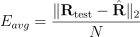
where
 is the number of QoIs in the response,
  is the
test responses and
is the
test responses and  is the surrogate responses.
- property max_error_history
Returns the list of errors for the max error history. The max error is calculated using

where
is the
test responses and is the surrogate responses.
- score(surrogate_index=-1)[source]
Returns the
 test score for the surrogate.
- Parameters:
surrogate_index (int) – optionally pick which surrogate to return the score for.
- property sample_count_history
Returns a list containing the number of samples used by each surrogate training step.
- class matcal.core.adaptive_surrogates.SparseGridAdaptiveSurrogate(target_field_name, indep_variable_name, indep_variable_values, variable_transformer, test_params, test_responses, param_names, bounds)[source]
Create an
AdaptiveSurrogateinstance.- Parameters:
target_field_name (str) – Name of the model field that the surrogate will approximate (e.g.,
"temperature").indep_variable_name (str) – Name of the auxiliary independent variable (e.g.,
"time"or"x_position") that will be attached to the surrogate output.indep_variable_values (array‑like of real numbers) – The values of the independent variable at which the surrogate should be evaluated.
variable_transformer (object with
map_to_canonicalandmap_from_canonicalmethods) – Object that maps model parameters to the canonical space required by the surrogate library.test_params (
numpy.ndarrayof shape(n_parameters, n_test)) – Parameter samples used for testing the surrogate.test_responses (
numpy.ndarrayof shape(n_test, n_qois)) – Corresponding model responses for the test parameter samples.param_names (list[str]) – Ordered list of parameter names that define the mapping between positional arguments and model parameters.
The constructor stores the supplied information and prepares internal containers that will hold the surrogate objects, error histories and sample counts as the adaptive training proceeds.
- property average_error_history
Returns the list of errors for the average error history. The average error is calculated using
where
is the number of QoIs in the response, is the
test responses and is the surrogate responses.
- property current_surrogate
Return the most recent surrogate (or
Noneif no iteration yet).
- enforce_training_data_parameter_range(enforce_training_data_parameter_range=True)
By default the surrogate will error if called with a parameter set outside of the parameter ranges used in the training data set. To call the surrogate for parameters outside of the training data range, call this method with the argument set to False. Adherence to the training data range can be reactivated by calling this method with the argument set to True.
- Parameters:
ignore_training_range – bool flag to ignore training data range.
- property max_error_history
Returns the list of errors for the max error history. The max error is calculated using
where
is the
test responses and is the surrogate responses.
- property sample_count_history
Returns a list containing the number of samples used by each surrogate training step.
- score(surrogate_index=-1)
Returns the
test score for the surrogate.- Parameters:
surrogate_index (int) – optionally pick which surrogate to return the score for.
- class matcal.core.adaptive_surrogates.AdaptiveSurrogateStudyBase(*parameters)[source]
- Parameters:
parameters (list(
Parameter) orParameterCollection) – The parameters of interest for the study.- Raises:
StudyTypeError – if parameters is of incorrect type.
- set_error_stopping_criteria(average_l2_error_goal: float = 0.01, max_abs_error_goal: float = 0.1)[source]
Set the error thresholds that determine when the adaptive surrogate training stops.
When the average L2 error falls below
average_l2_error_goalor the maximum absolute error falls belowmax_abs_error_goalthe training loop terminates (provided at least two batches have been evaluated).- Parameters:
average_l2_error_goal (float, optional) – Desired upper bound for the average L2 error. Must be a positive number.
max_abs_error_goal (float, optional) – Desired upper bound for the maximum absolute error. Must be a positive number.
- set_independent_variable(independent_variable, independent_variable_values)[source]
Specify an independent (auxiliary) variable and the values at which the surrogate will be evaluated.
This variable is not a model input; it is a field that will be used later (for example, a spatial coordinate, a time step, or any other scalar quantity that the surrogate should be conditioned on). The surrogate will be trained on the parameter samples generated by the study and then provide a response at each value supplied in
independent_variable_values.- Parameters:
independent_variable (str) – Name of the independent variable (e.g.
"time","x_position", …) that will be attached to the surrogate output.independent_variable_values (array‑like of real numbers) – A 1‑D array‑like collection of real numbers indicating the points at which the surrogate should be queried.
- set_number_of_test_samples(number_of_test_samples)[source]
Set the number of samples that will be used for testing. By default we test against
max_training_samples/20 or the number of parameters*10, whichever is greater.- Parameters:
max_training_samples (int) – desired number of test samples
- set_max_training_samples(max_training_samples=1000)[source]
Set the maximum number of training samples you want to be run for Sparse Grid surrogate generation. If the convergence criteria is not reached, the training for the surrogate will stop after max_training_samples has been reached.
- Parameters:
max_training_samples (int) – desired maximum number of samples
- set_test_data(study_results)[source]
Provide an external test‑data set for the adaptive surrogate study. This must contain the model name and field names necessary for the surrogate. This should only be used when re-running surrogate generation with a previously existing test set from a previous run where surrogate training was attempted. The independent variable data must also match what is specified for surrogate training.
If this method is not called, the adaptive study will automatically generate a test data set using a Halton sampling design. The number of test samples is taken from the value set via
set_number_of_test_samples()(default ismax_training_samples // 20orn_parameters * 10, whichever is larger). Supplying an explicit test data set overrides that behavior.- Parameters:
study_results (
StudyResultsorstr) – The test data to be used for surrogate evaluation. * StudyResults – aStudyResultsinstance containing the desired parameter history and simulation results. * str – a path to a serialized.joblibfile that, when loaded returns aStudyResultsobject.- Raises:
TypeError – If
study_resultsis neither aStudyResultsinstance nor a string.FileNotFoundError – If
study_resultsis a string but the file cannot be located or loaded.RuntimeError – If the loaded object is not a
StudyResultsinstance.
- Notes:
The supplied test set is only used for validation of the surrogate;
it is never incorporated into the training data. * Calling this method multiple times replaces any previously stored test data with the most recent value. * The test data must be compatible with the study’s parameter space (same parameter names and bounds as the training data).
- set_target_field_name(target_field_name)[source]
Specify the field name for the response that the surrogate model will seek to replicate. This is generally a model response such as temperature, load, etc.
- Parameters:
target_field_name (str) – the name of the field that the surrogate will replicate
- set_test_group_random_seed(seed)[source]
Set the random seed for the random generator that the study uses to generate the test samples only. The method should be called before
launch()to guarantee reproducibility.- Parameters:
seed (int) – Integer seed for the pseudo‑random number generator.
- add_evaluation_set(model, state=None, qoi_extractor=None)[source]
Add an evaluation set that uses a
SimulationResultsSynchronizergenerated from the study’s independent variable, independent‑variable values, and target field name.Warning
For adaptive surrogates, this can only be called once as the training points are adaptively chosen based on the response of interest.
This method is a thin wrapper around
StudyBase.add_evaluation_set(). It accepts only the model (required) and an optional state argument.statemust be a singleStateinstance; a collection of states is not supported. IfstateisNoneMatCal’s default state will be used.The synchronizer is built automatically from the attributes that were defined via
set_independent_variable()andset_target_field_name().- Parameters:
model (
ModelBase) – The model that will generate the simulation data.state (
State, optional) – The single state to which the evaluation set should be applied. IfNonethe model’s default state is used.qoi_extractor (
UserDefinedExtractor) – Provide aUserDefinedExtractorthat will act on the simulation results to provide a quantity of interest for the surrogate. It must return target field values of the same length of the independent variable values.
- Raises:
RuntimeError – If the required attributes for the synchronizer (independent variable, its values, or target field name) have not been set.
- launch()[source]
Run the initial test‑sampling study in a dedicated sub‑directory, then continue with the adaptive Sparse‑Grid workflow.
The test‑sampling phase is performed by a standard HaltonStudy to generate the required test points. If the user called
StudyBase.set_working_directory()before launching the study, the test‑sampling directory is created by appending the suffix"_test_samples"to the user‑provided path. Otherwise, the test samples are run in a local directory named"test_samples". After the test sample study finishes, the original working directory is restored and the surrogate‑building routine is started.
- property surrogate
Return the
AdaptiveSurrogateinstance that holds the surrogate models and their training history.- Returns:
The surrogate object, or
Noneif the study has not yet created one (i.e., beforelaunch()is called).- Return type:
AdaptiveSurrogate| None
- set_surrogate_save_filename(filename)[source]
Set the path used to save the surrogate object after each training batch.
The surrogate (an
AdaptiveSurrogateinstance) is periodically saved to disk withmatcal.core.serializer_wrapper.matcal_save(). The filename must be a non‑empty string that ends with the.joblibextension. The directory component of the path is not created automatically; it must already exist or be created by the user prior to calling this method.- Parameters:
filename (str) – Full path (absolute or relative) to the file that will store the surrogate. The filename must end with
.joblib. Example:"my_model_sparse_grid_surrogate.joblib"or"/tmp/surrogate.joblib".- Raises:
ValueError – If filename does not contain the required
.joblibsuffix or is empty.TypeError – If filename is not a string.
- property surrogate_save_filename
Retrieve the filename (including the
.joblibextension) that will be used to save the surrogate object after each training batch.- Returns:
The absolute or relative path supplied via
set_surrogate_save_filename(), orNoneif no filename has been set.- Return type:
str | None
- property results_synchronizer
Return the
SimulationResultsSynchronizerthat was created for this adaptive surrogate study.The synchronizer is responsible for evaluating the model at the user‑provided independent‑variable locations and extracting the target field (the quantity of interest) from the simulation output. It is constructed the first time
add_evaluation_set()is called and stored internally asself._results_synchronizer. As a result, this should be called after an evaluation set is added to the study.- Returns:
The
SimulationResultsSynchronizerinstance associated with the study, orNoneif the synchronizer has not yet been created (i.e.add_evaluation_sethas not been called).- Return type:
- add_parameter_preprocessor(parameter_preprocessor)
Add a parameter preprocessor to the study that will operate on the parameters before they are sent to the models. See
UserDefinedParameterPreprocessor.- Parameters:
parameter_preprocessor (
UserDefinedParameterPreprocessor) – the parameter preprocessor that will modify and update the given model parameters
- property final_results_filename
Returns the filename for the final results file for the current study.
return: final results filename as an absolute path rtype: str
- make_residuals_study()
This changes the stored total objectives to be the L2 norm of one long concatenated residual from all objectives added using
add_evaluation_set()
- make_total_objective_study()
This changes the stored total objectives to be a summation of all metric function results.
- plot_progress()
Calling this method will cause matcal to generate automatic plots after each batch of parameter evaluations. These plots are made using the standard plotter and will show things such as objective value evolution.
- restart()
Sets the study to launch in restart mode. The study will use existing results from previous launches to populate the results instead of running the simulations again. Note that this feature requires that no changes to the study to be made in order for the study to produce correct results.
Files from previous runs are read in to this study, they should not be deleted. Missing files may cause errors in the restart.
If any random number generation is used in the calculation. It is important to set the same seed value as used previously
- property results
Return access to the study’s results. Will return None, if study has not been run.
- run_in_serial()
Tell MatCal to run evaluations in serial. This is only recommended if the study is serial, like a MCMC Bayes Study, and the model evaluations are fast, like a python model.
Running in serial avoids the overhead of reloading large data sets that are necessary in async studies.
- set_Halton_scramble(scramble=True)
- Parameters:
scramble (bool) – set the scramble keyword for the numpy Halton object.
- set_cleanup_mode(new_pruner: DirectoryPrunerBase)
Changes the pruner to the object passed as an argument
- set_core_limit(core_limit, override_max_limit=False)
Sets the total number of cores that the study may use.
- Parameters:
core_limit (int) – The max number of cores that the study can use at any time.
override_max_limit – Override the default max cores that can be specified for a given study. The current limit of 500 is recommended by the MatCal team but might not be best for all cases.
- Raises:
StudyTypeError – if the passed value is not an int.
- set_number_of_samples(nsamples=20, skip=None)
Set the number of samples for the study.
- Parameters:
nsamples (int) – Number of parameter samples to generate from Halton sequence.
skip (int) – When continuing an existing design, the user may optionally skip ahead in the Halton sequence by an amount determined by ‘skip’.
- set_parameters(*parameters)
- Parameters:
parameters (
ParameterorParameterCollection) – The parameters of interest for the study.- Raises:
StudyTypeError – if the parameters are of incorrect type.
- set_results_storage_options(data: bool = True, qois: bool = True, residuals: bool = True, objectives: bool = True, weighted_conditioned: bool = False, results_save_frequency: int = 1)
Set which history information to save and return with the study results. You can also down sample which evaluations to save using results_save_frequency. This is particularly useful if you wish to not store finite difference evaluations for gradient based studies. The total objective is always stored.
- Parameters:
data (bool) – Store the raw data for each simulation and the raw experimental data for each objective for each desired evaluation.
qois (bool) – Store the QoIs for each objective for each desired evaluation. This includes both experiment and simulation QoIs
residuals (bool) – Store the residuals for each objective for each desired evaluation.
objectives (bool) – Store the objective by state and evaluation set for each desired evaluation.
weighted_conditioned (bool) – Store the weighted and conditioned values for each desired evaluation. This will save the weighted and conditioned, residuals, simulation qois and experiment qois.
results_save_frequency (int) – Set how the results save interval. For studies where finite difference derivatives are used, an interval of
 will exclude finite difference results from the saved
results history.
will exclude finite difference results from the saved
results history.
- set_seed(seed)
Set the random seed for the random generator that the study uses to generate the samples. The method should be called before
launch()to guarantee reproducibility.- Parameters:
seed (int) – Integer seed for the pseudo‑random number generator.
- set_use_threads(always_use_threads=False)
By default, MatCal assumes that the model being run is CPU intensive. As a result, it runs each model in a subprocess which can result in some additional overhead. If running studies cheaper python models, it may be beneficial to use threading instead of a subprocess. Using this method will run the study with threading if only one model can be evaluated at a time. You can optionally run with threads even with concurrent model evaluations with the “always_use_threads” option; however, this can be less reliable. For large memory calibrations, we always recommend using subprocess.
Finally, any external executable is always run using subprocess, but threading can be use to manage that job and return its results.
- Parameters:
always_use_threads (bool) – if true, MatCal will use threads over subprocess for concurrent modeling jobs. Defaults to False.
- set_working_directory(working_directory, remove_existing=False)
By default, MatCal runs in the current working directory. This method allows the user to specify a subdirectory in the current directory for the study to be run in. This method will create only the last directory in the path. So if the desired subdirectory is under a multiple folders from the current directory MatCal will error if the head of the path does not exist. See
os.path.split()for a definition of the path “head”.- Parameters:
working_directory (str) – The desired working directory for the current study. MatCal will only create the last folder if the path is a nested path.
remove_existing – If True, then the directory will be removed if pre-existing at study launch.
- class matcal.core.adaptive_surrogates.SparseGridAdaptiveSurrogateStudy(*parameters)[source]
The SparseGridAdaptiveSurrogateStudy builds a Sparse Grid adaptive surrogate using the PyApprox library. They generally behave well for larger parameter spaces and problems with discontinuities in the response of interest. Some downsides for these surrogates is that one must be trained independently for each response of interest. As a result, this surrogate requires only a single model and state be passed to it. It also requires that a target field name be specified for building the surrogate that signifies the response of interest for the surrogate.
- Parameters:
parameters (list(
Parameter) orParameterCollection) – The parameters of interest for the study.- Raises:
StudyTypeError – if parameters is of incorrect type.
- add_evaluation_set(model, state=None, qoi_extractor=None)
Add an evaluation set that uses a
SimulationResultsSynchronizergenerated from the study’s independent variable, independent‑variable values, and target field name.Warning
For adaptive surrogates, this can only be called once as the training points are adaptively chosen based on the response of interest.
This method is a thin wrapper around
StudyBase.add_evaluation_set(). It accepts only the model (required) and an optional state argument.statemust be a singleStateinstance; a collection of states is not supported. IfstateisNoneMatCal’s default state will be used.The synchronizer is built automatically from the attributes that were defined via
set_independent_variable()andset_target_field_name().- Parameters:
model (
ModelBase) – The model that will generate the simulation data.state (
State, optional) – The single state to which the evaluation set should be applied. IfNonethe model’s default state is used.qoi_extractor (
UserDefinedExtractor) – Provide aUserDefinedExtractorthat will act on the simulation results to provide a quantity of interest for the surrogate. It must return target field values of the same length of the independent variable values.
- Raises:
RuntimeError – If the required attributes for the synchronizer (independent variable, its values, or target field name) have not been set.
- add_parameter_preprocessor(parameter_preprocessor)
Add a parameter preprocessor to the study that will operate on the parameters before they are sent to the models. See
UserDefinedParameterPreprocessor.- Parameters:
parameter_preprocessor (
UserDefinedParameterPreprocessor) – the parameter preprocessor that will modify and update the given model parameters
- property final_results_filename
Returns the filename for the final results file for the current study.
return: final results filename as an absolute path rtype: str
- launch()
Run the initial test‑sampling study in a dedicated sub‑directory, then continue with the adaptive Sparse‑Grid workflow.
The test‑sampling phase is performed by a standard HaltonStudy to generate the required test points. If the user called
StudyBase.set_working_directory()before launching the study, the test‑sampling directory is created by appending the suffix"_test_samples"to the user‑provided path. Otherwise, the test samples are run in a local directory named"test_samples". After the test sample study finishes, the original working directory is restored and the surrogate‑building routine is started.
- make_residuals_study()
This changes the stored total objectives to be the L2 norm of one long concatenated residual from all objectives added using
add_evaluation_set()
- make_total_objective_study()
This changes the stored total objectives to be a summation of all metric function results.
- plot_progress()
Calling this method will cause matcal to generate automatic plots after each batch of parameter evaluations. These plots are made using the standard plotter and will show things such as objective value evolution.
- restart()
Sets the study to launch in restart mode. The study will use existing results from previous launches to populate the results instead of running the simulations again. Note that this feature requires that no changes to the study to be made in order for the study to produce correct results.
Files from previous runs are read in to this study, they should not be deleted. Missing files may cause errors in the restart.
If any random number generation is used in the calculation. It is important to set the same seed value as used previously
- property results
Return access to the study’s results. Will return None, if study has not been run.
- property results_synchronizer
Return the
SimulationResultsSynchronizerthat was created for this adaptive surrogate study.The synchronizer is responsible for evaluating the model at the user‑provided independent‑variable locations and extracting the target field (the quantity of interest) from the simulation output. It is constructed the first time
add_evaluation_set()is called and stored internally asself._results_synchronizer. As a result, this should be called after an evaluation set is added to the study.- Returns:
The
SimulationResultsSynchronizerinstance associated with the study, orNoneif the synchronizer has not yet been created (i.e.add_evaluation_sethas not been called).- Return type:
- run_in_serial()
Tell MatCal to run evaluations in serial. This is only recommended if the study is serial, like a MCMC Bayes Study, and the model evaluations are fast, like a python model.
Running in serial avoids the overhead of reloading large data sets that are necessary in async studies.
- set_Halton_scramble(scramble=True)
- Parameters:
scramble (bool) – set the scramble keyword for the numpy Halton object.
- set_cleanup_mode(new_pruner: DirectoryPrunerBase)
Changes the pruner to the object passed as an argument
- set_core_limit(core_limit, override_max_limit=False)
Sets the total number of cores that the study may use.
- Parameters:
core_limit (int) – The max number of cores that the study can use at any time.
override_max_limit – Override the default max cores that can be specified for a given study. The current limit of 500 is recommended by the MatCal team but might not be best for all cases.
- Raises:
StudyTypeError – if the passed value is not an int.
- set_error_stopping_criteria(average_l2_error_goal: float = 0.01, max_abs_error_goal: float = 0.1)
Set the error thresholds that determine when the adaptive surrogate training stops.
When the average L2 error falls below
average_l2_error_goalor the maximum absolute error falls belowmax_abs_error_goalthe training loop terminates (provided at least two batches have been evaluated).- Parameters:
average_l2_error_goal (float, optional) – Desired upper bound for the average L2 error. Must be a positive number.
max_abs_error_goal (float, optional) – Desired upper bound for the maximum absolute error. Must be a positive number.
- set_independent_variable(independent_variable, independent_variable_values)
Specify an independent (auxiliary) variable and the values at which the surrogate will be evaluated.
This variable is not a model input; it is a field that will be used later (for example, a spatial coordinate, a time step, or any other scalar quantity that the surrogate should be conditioned on). The surrogate will be trained on the parameter samples generated by the study and then provide a response at each value supplied in
independent_variable_values.- Parameters:
independent_variable (str) – Name of the independent variable (e.g.
"time","x_position", …) that will be attached to the surrogate output.independent_variable_values (array‑like of real numbers) – A 1‑D array‑like collection of real numbers indicating the points at which the surrogate should be queried.
- set_max_training_samples(max_training_samples=1000)
Set the maximum number of training samples you want to be run for Sparse Grid surrogate generation. If the convergence criteria is not reached, the training for the surrogate will stop after max_training_samples has been reached.
- Parameters:
max_training_samples (int) – desired maximum number of samples
- set_number_of_samples(nsamples=20, skip=None)
Set the number of samples for the study.
- Parameters:
nsamples (int) – Number of parameter samples to generate from Halton sequence.
skip (int) – When continuing an existing design, the user may optionally skip ahead in the Halton sequence by an amount determined by ‘skip’.
- set_number_of_test_samples(number_of_test_samples)
Set the number of samples that will be used for testing. By default we test against
max_training_samples/20 or the number of parameters*10, whichever is greater.- Parameters:
max_training_samples (int) – desired number of test samples
- set_parameters(*parameters)
- Parameters:
parameters (
ParameterorParameterCollection) – The parameters of interest for the study.- Raises:
StudyTypeError – if the parameters are of incorrect type.
- set_results_storage_options(data: bool = True, qois: bool = True, residuals: bool = True, objectives: bool = True, weighted_conditioned: bool = False, results_save_frequency: int = 1)
Set which history information to save and return with the study results. You can also down sample which evaluations to save using results_save_frequency. This is particularly useful if you wish to not store finite difference evaluations for gradient based studies. The total objective is always stored.
- Parameters:
data (bool) – Store the raw data for each simulation and the raw experimental data for each objective for each desired evaluation.
qois (bool) – Store the QoIs for each objective for each desired evaluation. This includes both experiment and simulation QoIs
residuals (bool) – Store the residuals for each objective for each desired evaluation.
objectives (bool) – Store the objective by state and evaluation set for each desired evaluation.
weighted_conditioned (bool) – Store the weighted and conditioned values for each desired evaluation. This will save the weighted and conditioned, residuals, simulation qois and experiment qois.
results_save_frequency (int) – Set how the results save interval. For studies where finite difference derivatives are used, an interval of
will exclude finite difference results from the saved
results history.
- set_seed(seed)
Set the random seed for the random generator that the study uses to generate the samples. The method should be called before
launch()to guarantee reproducibility.- Parameters:
seed (int) – Integer seed for the pseudo‑random number generator.
- set_surrogate_save_filename(filename)
Set the path used to save the surrogate object after each training batch.
The surrogate (an
AdaptiveSurrogateinstance) is periodically saved to disk withmatcal.core.serializer_wrapper.matcal_save(). The filename must be a non‑empty string that ends with the.joblibextension. The directory component of the path is not created automatically; it must already exist or be created by the user prior to calling this method.- Parameters:
filename (str) – Full path (absolute or relative) to the file that will store the surrogate. The filename must end with
.joblib. Example:"my_model_sparse_grid_surrogate.joblib"or"/tmp/surrogate.joblib".- Raises:
ValueError – If filename does not contain the required
.joblibsuffix or is empty.TypeError – If filename is not a string.
- set_target_field_name(target_field_name)
Specify the field name for the response that the surrogate model will seek to replicate. This is generally a model response such as temperature, load, etc.
- Parameters:
target_field_name (str) – the name of the field that the surrogate will replicate
- set_test_data(study_results)
Provide an external test‑data set for the adaptive surrogate study. This must contain the model name and field names necessary for the surrogate. This should only be used when re-running surrogate generation with a previously existing test set from a previous run where surrogate training was attempted. The independent variable data must also match what is specified for surrogate training.
If this method is not called, the adaptive study will automatically generate a test data set using a Halton sampling design. The number of test samples is taken from the value set via
set_number_of_test_samples()(default ismax_training_samples // 20orn_parameters * 10, whichever is larger). Supplying an explicit test data set overrides that behavior.- Parameters:
study_results (
StudyResultsorstr) – The test data to be used for surrogate evaluation. * StudyResults – aStudyResultsinstance containing the desired parameter history and simulation results. * str – a path to a serialized.joblibfile that, when loaded returns aStudyResultsobject.- Raises:
TypeError – If
study_resultsis neither aStudyResultsinstance nor a string.FileNotFoundError – If
study_resultsis a string but the file cannot be located or loaded.RuntimeError – If the loaded object is not a
StudyResultsinstance.
- Notes:
The supplied test set is only used for validation of the surrogate;
it is never incorporated into the training data. * Calling this method multiple times replaces any previously stored test data with the most recent value. * The test data must be compatible with the study’s parameter space (same parameter names and bounds as the training data).
- set_test_group_random_seed(seed)
Set the random seed for the random generator that the study uses to generate the test samples only. The method should be called before
launch()to guarantee reproducibility.- Parameters:
seed (int) – Integer seed for the pseudo‑random number generator.
- set_use_threads(always_use_threads=False)
By default, MatCal assumes that the model being run is CPU intensive. As a result, it runs each model in a subprocess which can result in some additional overhead. If running studies cheaper python models, it may be beneficial to use threading instead of a subprocess. Using this method will run the study with threading if only one model can be evaluated at a time. You can optionally run with threads even with concurrent model evaluations with the “always_use_threads” option; however, this can be less reliable. For large memory calibrations, we always recommend using subprocess.
Finally, any external executable is always run using subprocess, but threading can be use to manage that job and return its results.
- Parameters:
always_use_threads (bool) – if true, MatCal will use threads over subprocess for concurrent modeling jobs. Defaults to False.
- set_working_directory(working_directory, remove_existing=False)
By default, MatCal runs in the current working directory. This method allows the user to specify a subdirectory in the current directory for the study to be run in. This method will create only the last directory in the path. So if the desired subdirectory is under a multiple folders from the current directory MatCal will error if the head of the path does not exist. See
os.path.split()for a definition of the path “head”.- Parameters:
working_directory (str) – The desired working directory for the current study. MatCal will only create the last folder if the path is a nested path.
remove_existing – If True, then the directory will be removed if pre-existing at study launch.
- property surrogate
Return the
AdaptiveSurrogateinstance that holds the surrogate models and their training history.- Returns:
The surrogate object, or
Noneif the study has not yet created one (i.e., beforelaunch()is called).- Return type:
AdaptiveSurrogate| None
- property surrogate_save_filename
Retrieve the filename (including the
.joblibextension) that will be used to save the surrogate object after each training batch.- Returns:
The absolute or relative path supplied via
set_surrogate_save_filename(), orNoneif no filename has been set.- Return type:
str | None
- class matcal.core.adaptive_surrogates.VoronoiAdaptiveSurrogateStudy(*parameters)[source]
Initialize the VoronoiAdaptiveSurrogateStudy
- set_number_of_initial_samples(num_initial_samples=None)[source]
- Parameters:
num_initial_samples – The number of samples to initiate the algorithm with.
The initial samples are used to train the initial surrogate and built the initial voronoi tessellation. Default 10*ndim. :type initial_training_length: None or int
- set_voronoi_sampling_options(voronoi_type='full', finite_only=False, iterative_updates=True, thin=None, random_selection=None)[source]
Set options pertaining to the voronoi sampling algorithm. Properties that can be altered are listed below.
- Parameters:
vornoi_type –
Defines which Vornoi-based sampling strategy to use. Supported options are:
’full’: Constructs the full Voronoi tessellation over all points (Default)
- ’local’: Constructs a local Voronoi tessellation using only nearby
points determined by k-nearest neighbors. This can reduce computational cost in high dimensions.
finite_only – If True, only Vornoi vertices that lie inside the convex hull defined by the boundary points are consided as candidate sample locations. If False, all vertices are considered, and those lying outside the parameter bounds are clipped back to the convex hull. This is more flexible but can be more computationally expensive, especially in high dimensions.
iterative_updates (bool) – If True, the Voronoi tessellation is recomputed after each new sample is added, promoting a more space-filling design. If False, the tessellation is updated once per batch after all samples in the batch are selected. This can be faster but may result in sample clustering.
thin (int or None) – If specified, every nth candidate sample location is selected as a new sample location. This can significantly reduce computational cost in high-dimensional spaces.
random_selection (int or None) – If sepecified, this defines the number of candidate sample locations that are randomly selected as new samples. This provides an alternative way to reduce computational cost in high-dimensional problems.
- set_surrogate_options(**kwargs)[source]
- Parameters:
regressor_kwargs – A keyword selection of parameters to pass to the predictor used. Please refer to the sklearn documentation for more information for what can be passed to the predictors.
- set_convergence_criteria(eps=1e-12, convergence_metric='nlpd')[source]
Convergence is determined by comparing RMSE or NLPD of surrogate between two successive batches.
- Parameters:
convergence_metric – Choose from root mean squared error (‘rmse’) or negative log posterior density (‘nlpd’) to track surrogate performance at each batch iteration. This metric is used to determine if the surrogate has converged according to eps.
eps (float) – Tolerance for surrogate convergence.
- set_cross_validation_options(nsplits=5, nmax_folds=3, nmax_loo=10, cv_scale=1.0, cv_metric='rmse', group_kfold=False)[source]
Set options for cross validation. Properties that can be altered are listed below.
- Parameters:
nsplits (int) – The number of folds to use in k-fold cross validation. If nsplits = 0, k-fold cross-validation is skipped entirely and new samples are instead selected from every region of the Voronoi tessellation defined by the current set of training samples.
nmax_folds (int) – Points in the folds with the highest k-fold error (the top nmax_folds) define the Voronoi regions from which new samples will be drawn.
nmax_loo (int or 'all') – Points with the largest leave-one-out cross-validation (LOOCV) errors (the top nmax_loo). These define the Voronoi regions from which new samples will be drawn. If nmax_loo = ‘all’, then new samples are drawn from all Voronoi regions defined by nmax_folds, and leave-one-out cross-validation is not performed.
cv_scale – Optional scaling applied to output before calculating errors in cross-validation and leave-one-out cross-validation. This can be used to balance error magnitude across dimensions or outputs.
cv_metric (str) –
Determines which metric is used when computing errors during cross-validation. Supported options are:
rmse – root mean squared error (Default)
nlpd – negative log posterior density
group_kfold (bool) – If True, samples are grouped using k-means clustering prior to k-fold cross-validation so that nearby points are allways assigned to the same fold. This prevents spatially correllated points from being split across training and validation sets. If False, folds are assigned randomly by the standard KFold algorithm.
- add_evaluation_set(model, state=None, qoi_extractor=None)
Add an evaluation set that uses a
SimulationResultsSynchronizergenerated from the study’s independent variable, independent‑variable values, and target field name.Warning
For adaptive surrogates, this can only be called once as the training points are adaptively chosen based on the response of interest.
This method is a thin wrapper around
StudyBase.add_evaluation_set(). It accepts only the model (required) and an optional state argument.statemust be a singleStateinstance; a collection of states is not supported. IfstateisNoneMatCal’s default state will be used.The synchronizer is built automatically from the attributes that were defined via
set_independent_variable()andset_target_field_name().- Parameters:
model (
ModelBase) – The model that will generate the simulation data.state (
State, optional) – The single state to which the evaluation set should be applied. IfNonethe model’s default state is used.qoi_extractor (
UserDefinedExtractor) – Provide aUserDefinedExtractorthat will act on the simulation results to provide a quantity of interest for the surrogate. It must return target field values of the same length of the independent variable values.
- Raises:
RuntimeError – If the required attributes for the synchronizer (independent variable, its values, or target field name) have not been set.
- add_parameter_preprocessor(parameter_preprocessor)
Add a parameter preprocessor to the study that will operate on the parameters before they are sent to the models. See
UserDefinedParameterPreprocessor.- Parameters:
parameter_preprocessor (
UserDefinedParameterPreprocessor) – the parameter preprocessor that will modify and update the given model parameters
- property final_results_filename
Returns the filename for the final results file for the current study.
return: final results filename as an absolute path rtype: str
- launch()
Run the initial test‑sampling study in a dedicated sub‑directory, then continue with the adaptive Sparse‑Grid workflow.
The test‑sampling phase is performed by a standard HaltonStudy to generate the required test points. If the user called
StudyBase.set_working_directory()before launching the study, the test‑sampling directory is created by appending the suffix"_test_samples"to the user‑provided path. Otherwise, the test samples are run in a local directory named"test_samples". After the test sample study finishes, the original working directory is restored and the surrogate‑building routine is started.
- make_residuals_study()
This changes the stored total objectives to be the L2 norm of one long concatenated residual from all objectives added using
add_evaluation_set()
- make_total_objective_study()
This changes the stored total objectives to be a summation of all metric function results.
- plot_progress()
Calling this method will cause matcal to generate automatic plots after each batch of parameter evaluations. These plots are made using the standard plotter and will show things such as objective value evolution.
- restart()
Sets the study to launch in restart mode. The study will use existing results from previous launches to populate the results instead of running the simulations again. Note that this feature requires that no changes to the study to be made in order for the study to produce correct results.
Files from previous runs are read in to this study, they should not be deleted. Missing files may cause errors in the restart.
If any random number generation is used in the calculation. It is important to set the same seed value as used previously
- property results
Return access to the study’s results. Will return None, if study has not been run.
- property results_synchronizer
Return the
SimulationResultsSynchronizerthat was created for this adaptive surrogate study.The synchronizer is responsible for evaluating the model at the user‑provided independent‑variable locations and extracting the target field (the quantity of interest) from the simulation output. It is constructed the first time
add_evaluation_set()is called and stored internally asself._results_synchronizer. As a result, this should be called after an evaluation set is added to the study.- Returns:
The
SimulationResultsSynchronizerinstance associated with the study, orNoneif the synchronizer has not yet been created (i.e.add_evaluation_sethas not been called).- Return type:
- run_in_serial()
Tell MatCal to run evaluations in serial. This is only recommended if the study is serial, like a MCMC Bayes Study, and the model evaluations are fast, like a python model.
Running in serial avoids the overhead of reloading large data sets that are necessary in async studies.
- set_Halton_scramble(scramble=True)
- Parameters:
scramble (bool) – set the scramble keyword for the numpy Halton object.
- set_cleanup_mode(new_pruner: DirectoryPrunerBase)
Changes the pruner to the object passed as an argument
- set_core_limit(core_limit, override_max_limit=False)
Sets the total number of cores that the study may use.
- Parameters:
core_limit (int) – The max number of cores that the study can use at any time.
override_max_limit – Override the default max cores that can be specified for a given study. The current limit of 500 is recommended by the MatCal team but might not be best for all cases.
- Raises:
StudyTypeError – if the passed value is not an int.
- set_error_stopping_criteria(average_l2_error_goal: float = 0.01, max_abs_error_goal: float = 0.1)
Set the error thresholds that determine when the adaptive surrogate training stops.
When the average L2 error falls below
average_l2_error_goalor the maximum absolute error falls belowmax_abs_error_goalthe training loop terminates (provided at least two batches have been evaluated).- Parameters:
average_l2_error_goal (float, optional) – Desired upper bound for the average L2 error. Must be a positive number.
max_abs_error_goal (float, optional) – Desired upper bound for the maximum absolute error. Must be a positive number.
- set_independent_variable(independent_variable, independent_variable_values)
Specify an independent (auxiliary) variable and the values at which the surrogate will be evaluated.
This variable is not a model input; it is a field that will be used later (for example, a spatial coordinate, a time step, or any other scalar quantity that the surrogate should be conditioned on). The surrogate will be trained on the parameter samples generated by the study and then provide a response at each value supplied in
independent_variable_values.- Parameters:
independent_variable (str) – Name of the independent variable (e.g.
"time","x_position", …) that will be attached to the surrogate output.independent_variable_values (array‑like of real numbers) – A 1‑D array‑like collection of real numbers indicating the points at which the surrogate should be queried.
- set_max_training_samples(max_training_samples=1000)
Set the maximum number of training samples you want to be run for Sparse Grid surrogate generation. If the convergence criteria is not reached, the training for the surrogate will stop after max_training_samples has been reached.
- Parameters:
max_training_samples (int) – desired maximum number of samples
- set_number_of_samples(nsamples=20, skip=None)
Set the number of samples for the study.
- Parameters:
nsamples (int) – Number of parameter samples to generate from Halton sequence.
skip (int) – When continuing an existing design, the user may optionally skip ahead in the Halton sequence by an amount determined by ‘skip’.
- set_number_of_test_samples(number_of_test_samples)
Set the number of samples that will be used for testing. By default we test against
max_training_samples/20 or the number of parameters*10, whichever is greater.- Parameters:
max_training_samples (int) – desired number of test samples
- set_parameters(*parameters)
- Parameters:
parameters (
ParameterorParameterCollection) – The parameters of interest for the study.- Raises:
StudyTypeError – if the parameters are of incorrect type.
- set_results_storage_options(data: bool = True, qois: bool = True, residuals: bool = True, objectives: bool = True, weighted_conditioned: bool = False, results_save_frequency: int = 1)
Set which history information to save and return with the study results. You can also down sample which evaluations to save using results_save_frequency. This is particularly useful if you wish to not store finite difference evaluations for gradient based studies. The total objective is always stored.
- Parameters:
data (bool) – Store the raw data for each simulation and the raw experimental data for each objective for each desired evaluation.
qois (bool) – Store the QoIs for each objective for each desired evaluation. This includes both experiment and simulation QoIs
residuals (bool) – Store the residuals for each objective for each desired evaluation.
objectives (bool) – Store the objective by state and evaluation set for each desired evaluation.
weighted_conditioned (bool) – Store the weighted and conditioned values for each desired evaluation. This will save the weighted and conditioned, residuals, simulation qois and experiment qois.
results_save_frequency (int) – Set how the results save interval. For studies where finite difference derivatives are used, an interval of
will exclude finite difference results from the saved
results history.
- set_seed(seed)
Set the random seed for the random generator that the study uses to generate the samples. The method should be called before
launch()to guarantee reproducibility.- Parameters:
seed (int) – Integer seed for the pseudo‑random number generator.
- set_surrogate_save_filename(filename)
Set the path used to save the surrogate object after each training batch.
The surrogate (an
AdaptiveSurrogateinstance) is periodically saved to disk withmatcal.core.serializer_wrapper.matcal_save(). The filename must be a non‑empty string that ends with the.joblibextension. The directory component of the path is not created automatically; it must already exist or be created by the user prior to calling this method.- Parameters:
filename (str) – Full path (absolute or relative) to the file that will store the surrogate. The filename must end with
.joblib. Example:"my_model_sparse_grid_surrogate.joblib"or"/tmp/surrogate.joblib".- Raises:
ValueError – If filename does not contain the required
.joblibsuffix or is empty.TypeError – If filename is not a string.
- set_target_field_name(target_field_name)
Specify the field name for the response that the surrogate model will seek to replicate. This is generally a model response such as temperature, load, etc.
- Parameters:
target_field_name (str) – the name of the field that the surrogate will replicate
- set_test_data(study_results)
Provide an external test‑data set for the adaptive surrogate study. This must contain the model name and field names necessary for the surrogate. This should only be used when re-running surrogate generation with a previously existing test set from a previous run where surrogate training was attempted. The independent variable data must also match what is specified for surrogate training.
If this method is not called, the adaptive study will automatically generate a test data set using a Halton sampling design. The number of test samples is taken from the value set via
set_number_of_test_samples()(default ismax_training_samples // 20orn_parameters * 10, whichever is larger). Supplying an explicit test data set overrides that behavior.- Parameters:
study_results (
StudyResultsorstr) – The test data to be used for surrogate evaluation. * StudyResults – aStudyResultsinstance containing the desired parameter history and simulation results. * str – a path to a serialized.joblibfile that, when loaded returns aStudyResultsobject.- Raises:
TypeError – If
study_resultsis neither aStudyResultsinstance nor a string.FileNotFoundError – If
study_resultsis a string but the file cannot be located or loaded.RuntimeError – If the loaded object is not a
StudyResultsinstance.
- Notes:
The supplied test set is only used for validation of the surrogate;
it is never incorporated into the training data. * Calling this method multiple times replaces any previously stored test data with the most recent value. * The test data must be compatible with the study’s parameter space (same parameter names and bounds as the training data).
- set_test_group_random_seed(seed)
Set the random seed for the random generator that the study uses to generate the test samples only. The method should be called before
launch()to guarantee reproducibility.- Parameters:
seed (int) – Integer seed for the pseudo‑random number generator.
- set_use_threads(always_use_threads=False)
By default, MatCal assumes that the model being run is CPU intensive. As a result, it runs each model in a subprocess which can result in some additional overhead. If running studies cheaper python models, it may be beneficial to use threading instead of a subprocess. Using this method will run the study with threading if only one model can be evaluated at a time. You can optionally run with threads even with concurrent model evaluations with the “always_use_threads” option; however, this can be less reliable. For large memory calibrations, we always recommend using subprocess.
Finally, any external executable is always run using subprocess, but threading can be use to manage that job and return its results.
- Parameters:
always_use_threads (bool) – if true, MatCal will use threads over subprocess for concurrent modeling jobs. Defaults to False.
- set_working_directory(working_directory, remove_existing=False)
By default, MatCal runs in the current working directory. This method allows the user to specify a subdirectory in the current directory for the study to be run in. This method will create only the last directory in the path. So if the desired subdirectory is under a multiple folders from the current directory MatCal will error if the head of the path does not exist. See
os.path.split()for a definition of the path “head”.- Parameters:
working_directory (str) – The desired working directory for the current study. MatCal will only create the last folder if the path is a nested path.
remove_existing – If True, then the directory will be removed if pre-existing at study launch.
- property surrogate
Return the
AdaptiveSurrogateinstance that holds the surrogate models and their training history.- Returns:
The surrogate object, or
Noneif the study has not yet created one (i.e., beforelaunch()is called).- Return type:
AdaptiveSurrogate| None
- property surrogate_save_filename
Retrieve the filename (including the
.joblibextension) that will be used to save the surrogate object after each training batch.- Returns:
The absolute or relative path supplied via
set_surrogate_save_filename(), orNoneif no filename has been set.- Return type:
str | None