Solid Bar Torsion Model
MatCal’s SolidBarTorsionModel
is meant to be used in calibrations requiring the simulation of the
Sandia developed solid bar torsion test where lower stress triaxialities are
required for parameter calibration (See [16]).
This model has all the MatCal standard
model features as described in MatCal SIERRA Solid Mechanics Standard Models.
In this section, we will provide more information about how the geometry is generated,
specifics on simulation boundary conditions,
and what is output from this model.
Note
Some examples and V&V studies that include these models are:
Solid bar torsion geometry and mesh generation
The solid bar torsion geometry uses the same
mesh generation script as is used by the
RoundUniaxialTensionModel
and requires the input for that model specified in
Uniaxial Tension Models. All inputs and behavior for
meshing are the same except that the geometry produced is
half of the model. The model is split at the specimen center
along the specimen axis with a plane that has its normal
aligned with the specimen axis.
Solid bar torsion boundary conditions
This model currently only includes  of the specimen geometry,
with antisymmetric solid mechanics boundary conditions at the specimen axial midplane. The boundary
condition nodesets are shown in Fig. 10.
of the specimen geometry,
with antisymmetric solid mechanics boundary conditions at the specimen axial midplane. The boundary
condition nodesets are shown in Fig. 10.
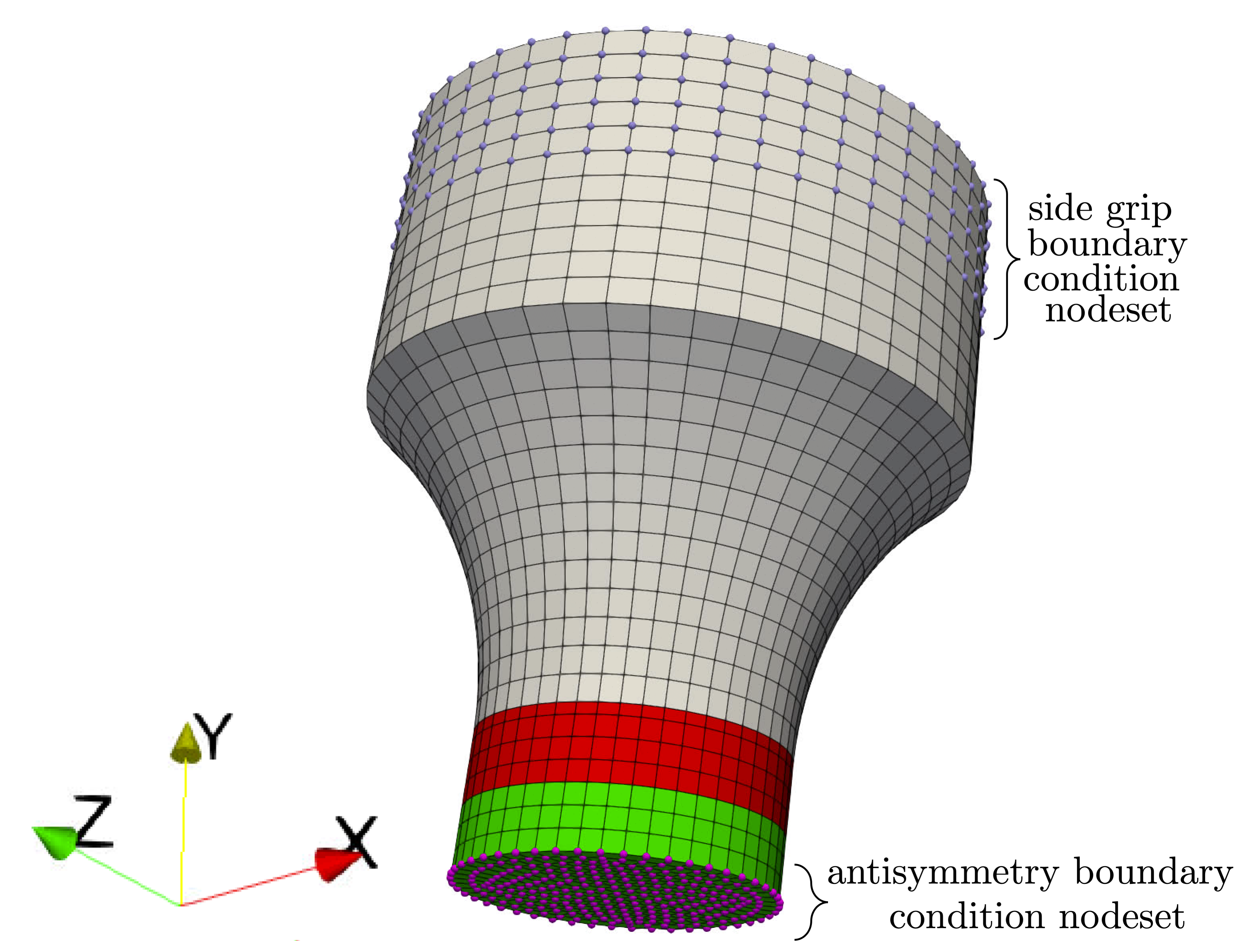
Fig. 10 The boundary condition node sets for this model are shown on its mesh. Two node sets are important, the side grip node set and the antisymmetry node set at the specimen midplane.
Since this model can easily be coupled with thermal modeling, the boundary condition descriptions have been separated into the following two subsections associated with the solid mechanics and thermal models.
Solid bar torsion solid mechanics boundary conditions
The model is deformed with a rotation applied to the side
grip node set. Positive rotations are applied around the
specimen axis (aligned with the global Y axis) according to
the right hand rule.
The applied rotation function is determined using the
add_boundary_condition_data().
This method must be supplied a Data or
DataCollection class that contains a
“grip_rotation” field for the
states of interest for the model with units of degrees.
The boundary condition data can also optionally include
a “time” field. The
add_boundary_condition_data()
method determines the boundary condition function to be applied
to the specimen according to the following
algorithm:
Determine the boundary condition by state since maximum deformation, material behavior and experiment setup can vary significantly over different states.
For each state, find the data set with the largest rotation and use it for boundary condition generation.
Perform no scaling on the rotation. This assumes that the deformation is primarily localized to the gauge section region of the specimen.
If the data do not contain a “time” field and there is not a
Stateparameter named “rotation_rate”, then apply a linear rotation function from zero to the maximum rotation found in the data over one second.If the data do not contain a “time” field and there is a
Stateparameter named “rotation_rate”, then apply a linear rotation function from zero to the maximum rotation found in the data. This is done over a time period beginning at zero seconds and ending at a time calculated by dividing the maximum rotation by the “rotation_rate”Stateparameter.If the data do contain a “time” field, use the rotation function directly as provided.
The remaining solid mechanics boundary conditions only include the antisymmetry boundary condition at the specimen midplane where the displacements are fixed around the specimen axis and normal to the mid plane. At this midplane, the nodes are allowed to displace in the radial direction only.
Solid bar torsion thermal model boundary conditions
Since MatCal SIERRA/SM standard models only allow
heat flux out of the specimen through the model’s
interface at the grips,
only the grip contact boundary condition is
described here. The boundary condition for the
grip-to-specimen interface
includes the nodes in the side grip node set.
As described in Staggered and iterative coupling,
the temperature at these nodes is fixed to the value of the State parameter
“temperature”. The entire body
of the model is prescribed an initial temperature of
State parameter
“temperature” for
all simulations regardless of coupling specification (uncoupled, staggered coupling,
iterative coupling or adiabatic). For uncoupled simulations, this is only done
if a temperature state variable is provided.
Solid bar torsion model specific output
By default, the solid bar torsion model includes the following global output fields:
time
applied_rotation - the rotation in degrees determined from the boundary condition data set
grip_rotation - the rotation in degrees measured at the applied boundary condition node set in the loading direction.
torque - measured at the applied boundary condition node set in the loading direction
If coupling is activated, the following global temperature output is provided:
low_temperature
med_temperature
high_temperature
and how they are calculated is dependent on the type of coupling. For adiabatic simulations, they are the minimum, average and maximum element temperatures in the gauge section of the model. For coupled simulations, the same quantities are provided by acting on the nodal temperatures instead of the element temperatures.
The model also includes torsion specific
exodus output that the user can output
if desired. Two nodal variables are available for
exodus output, cylindrical_displacement and
cylindrical_force_external. To add these to
the exodus output, you must call the
activate_exodus_output()
method and then add them to output using the
add_nodal_output_variable()
method. These variables are transformed to the cylindrical_coordinate_system
described in Simulation Coordinate Systems Available to the Material Model.
As a result, these nodal variables are defined in a local
Cartesian coordinate system defined at each node
in the model’s deformed configuration. As an
example, a drawing of the local
coordinate system displacements on a cylinder
is shown in Fig. 11.
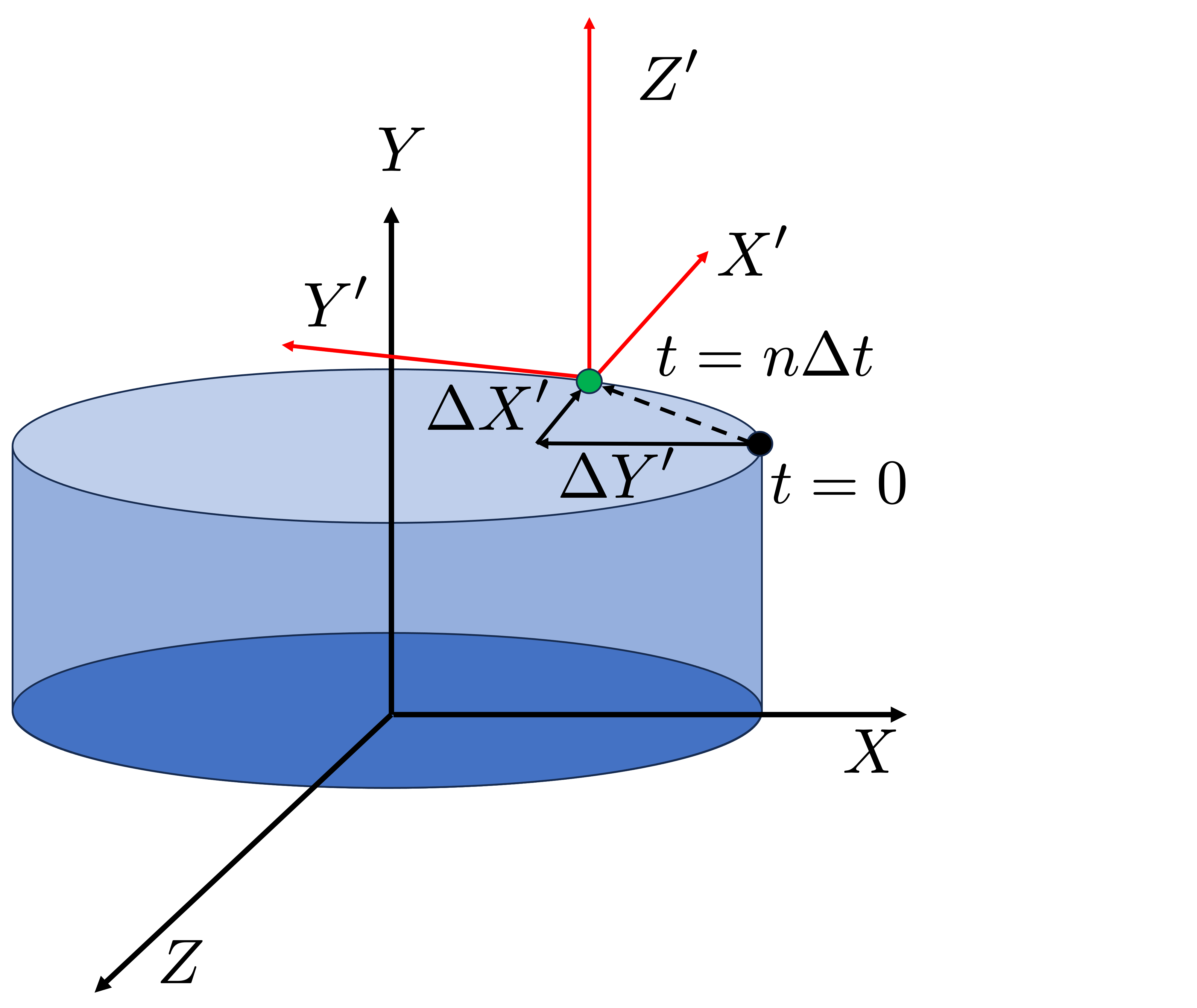
Fig. 11 A diagram showing the displacement of a point at  in
the cylindrical_coordinate_system local coordinate system. The
local coordinate system is defined in the model’s deformed configuration.
in
the cylindrical_coordinate_system local coordinate system. The
local coordinate system is defined in the model’s deformed configuration.